SellSignal looks different today. The web app was rebuilt over the past week, and version 1.1 of the iPhone app, the same redesign, is live on the App Store as of today. If you open either one, the first thing you see is no longer your exit plans. It is five coins worth a look, picked from the top 1,000 in the past hour.
This post covers what changed, why, and how to tell whether any of it works. That last part matters most, so it gets its own section.
Why the Product Changed Shape
SellSignal started as a tool for one moment: the one where your target hits and you have to decide whether to sell. Every post on this blog argued the same thing. Writing the plan is easy, and following it is hard.
That is still true, and the sell plan is still here. The trouble was that a product built only for that moment gave you little reason to open it between pings. So the app now leads with the question people actually ask every morning, which is what is moving, and is any of it worth my attention? The plan comes in when you have an answer.
Gem Finder: Five Coins an Hour
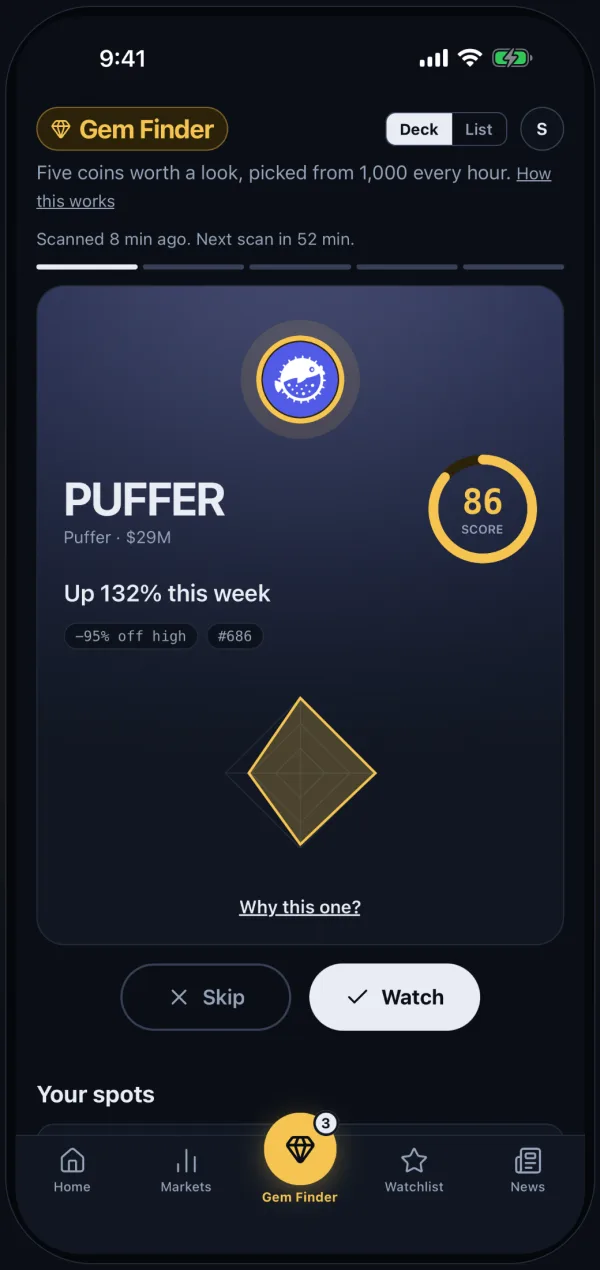
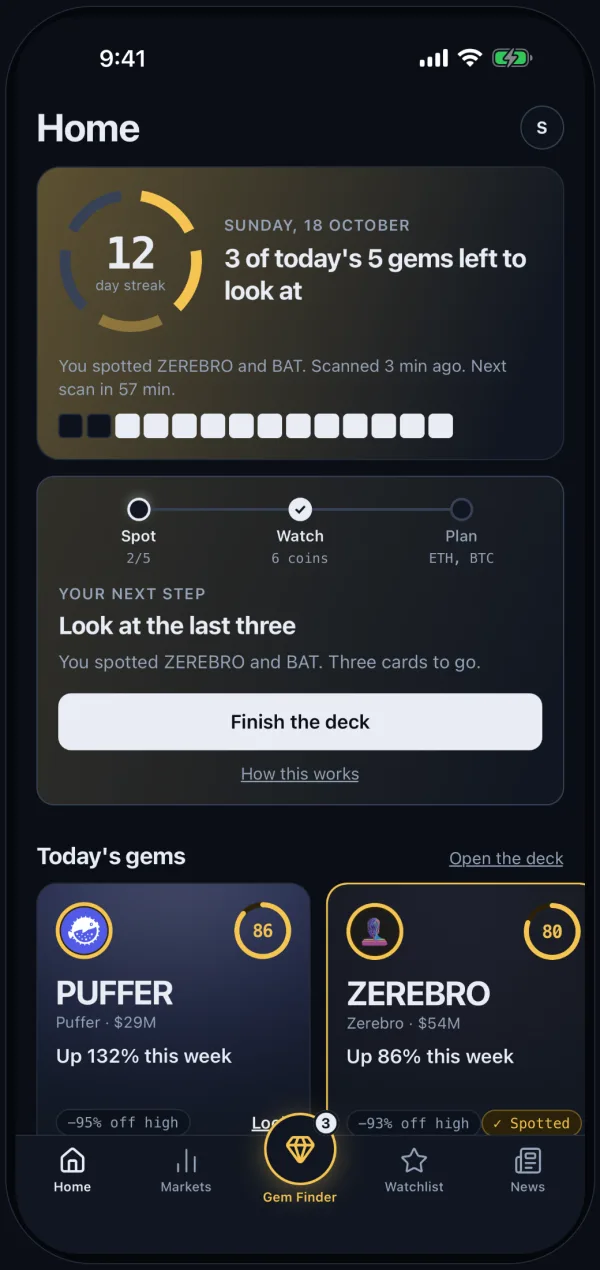
Every hour, Gem Finder reads the top 1,000 coins by market cap. It leaves out stablecoins and wrapped, staked and bridged tokens, because none of those are what anyone means by a gem. It keeps the five with the strongest signals and gives each a score from 0 to 100, a plain-English reason, and four signals you can check yourself.
The five arrive as a deck:
- Swipe through them. One card at a time, with the score, the week's move, how far the coin sits below its high, and its rank. Tap Why this one? for the reasoning.
- Watch or skip. Swipe right to watch, left to skip. A watched coin joins your watchlist, and the app remembers its price at the scan so you can see later how your spots did.
- Keep a streak. Check in once a day and the streak grows. Home shows it, how many of today's five you have left, and one next step.
You do not need an account to look. Signed out, you see today's five and the reason behind the top one. A free account opens the reasons on all five.
The Public Record
Any app can show you coins that went up. The honest question is how its picks did after it showed them, including the ones that went nowhere.
So every coin Gem Finder flags is logged with its price at the moment it was flagged. Seven days later, it is checked against real prices: did it reach +20% at any point in that week? Every pick is counted, hits and misses alike, and the track record is public. You can read it without signing in, and you should, before you decide how much weight to give the deck.
A note on what that number is not. Reaching +20% inside a week is a test of whether the scan finds coins that are moving. It is not a promise that you would have caught the move, and it says nothing about where the coin ended up. That is what the next section is for.
When It's Time to Sell
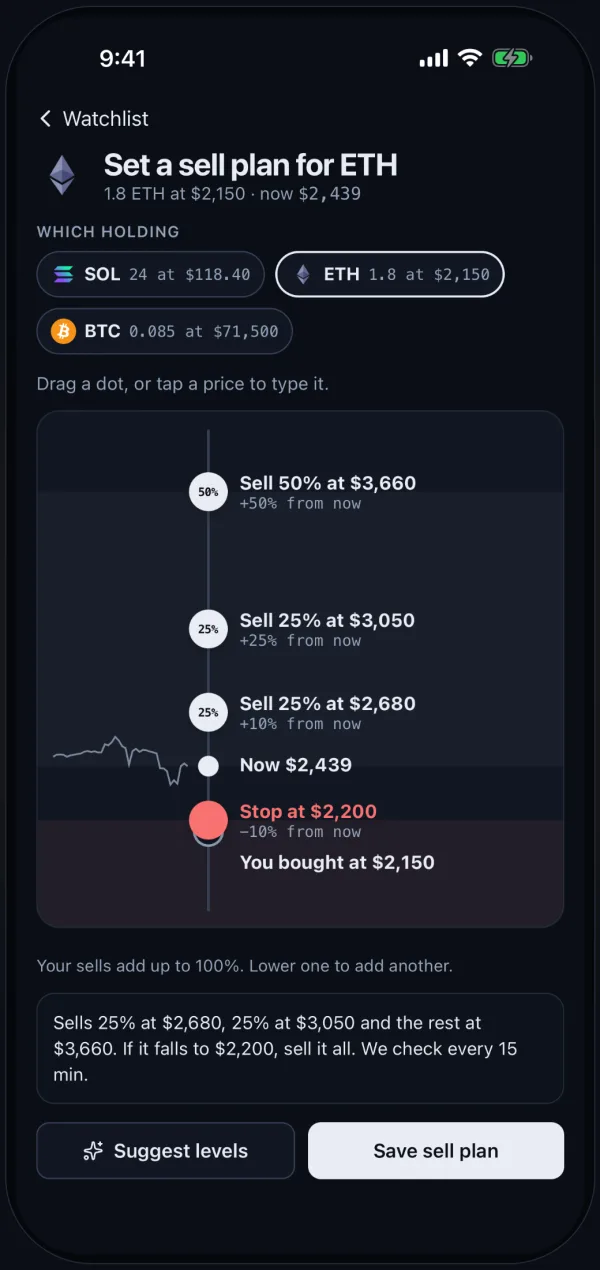
Small coins that run fast can give it all back just as fast. A gem you watch without an exit is a round trip waiting to happen. So the sell plan is now one drag away from any coin you hold:
- Draw it on the price line. Drag a dot to set a sell level, or tap a price to type it. Add a stop below. The plan reads back in one sentence, such as sells 25% at $2,680, 25% at $3,050 and the rest at $3,660, so you know exactly what you committed to.
- Let it watch for you. The plan is checked every 15 minutes. When a level hits, you get a ping that restates what you told yourself you would do, and you answer it on the record.
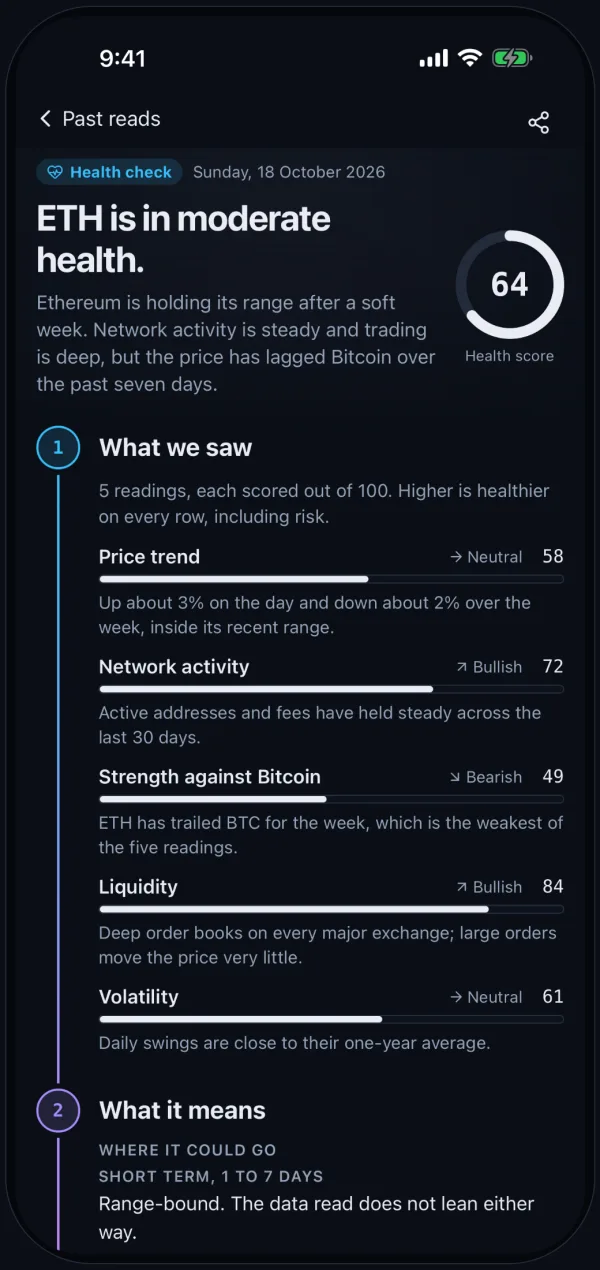
- Check a coin first. The health check now reads like a short story: five readings scored out of 100, what they mean, and where the coin could go. Your past checks live in Past reads, a timeline of every call you made and what came after.
Everything Else That Moved
- Markets is a heat grid or a list of move bars, whichever you prefer.
- News comes straight from publisher feeds, including CoinDesk, Cointelegraph and Decrypt, with today's gems and your coins first.
- Scenario is now a three step game: set a stake, pick a mood, and turn three possible endings face up one at a time.
- Emails arrive as SellSignal cards, with today's gems in them.
- Research and Compare are gone. Gem Finder and the health check cover the same ground with less to read.
Free and Pro
Gem Finder, the deck, your streak and the public record are free. The free plan also keeps 3 analyses a day, 3 tracked positions and 3 active sell plans. Pro is $8.99 a month or $79 a year. It adds Picks for you (up to 3 cards from today's scan, each with a reason and a first exit), 100 analyses a day, 20 price alerts, unlimited sell plans, Telegram decision pings, the weekly briefing and Scenario. Subscribe on the web or in the app and Pro applies in both places.
Getting the New Version
- On the web, there is nothing to do. Open Gem Finder and today's deck is there.
- On iPhone, update or install SellSignal from the App Store. Automatic updates roll out over the next week, but you can update by hand today.
- Swipe through today's five. Watch one if it earns it.
- If you already hold one of them, draw the sell plan before you need it.
Today’s gems
Latest scan 10:26 UTC



The Bottom Line
The old SellSignal was a good answer to a question you only asked once a month. The new one asks every hour what is worth your attention, writes down how its answers turned out, and keeps the exit plan ready for when it counts. Look at the record first. If it earns your trust, the deck is waiting.